Choosing a digital press is not a showroom decision. It is a factory decision.
The market is moving toward shorter runs, faster version changes, and more customized products. Smithers’ report, The Future of Digital Printing to 2029, identifies continued growth in digital print value, driven by personalization, automation, and production flexibility. Keypoint Intelligence also reports that workflow integration and total operating cost increasingly influence equipment decisions. These findings matter on the factory floor, where every idle hour, ink change, and rejected sheet affects profit.
So, how to choose the right digital printing solution for your factory? Start with evidence, not excitement. Measure your monthly volume, substrate range, color requirements, finishing needs, labor skills, and average job length. Then compare productivity at your real production speed, not only the brochure speed. A machine may look powerful but perform poorly with your materials.
Marco Boer, vice president of IT Strategies, has observed, “Digital printing is not simply a replacement for offset; it is a different business model.” That idea should guide the evaluation. The right solution may be a toner press, inkjet line, hybrid system, or a smaller machine supported by stronger workflow software. There is no universal winner.
Before approving a purchase, request live samples using your own files and substrates. Check registration, drying, color consistency, maintenance time, and operator feedback. Consider service response, consumables, software compatibility, and energy use. These details are easy to underestimate.
And one uncomfortable truth remains: the most expensive press is not always the wrong choice. The wrong production assumptions are. Industry reports offer direction, but your factory data must make the final decision.
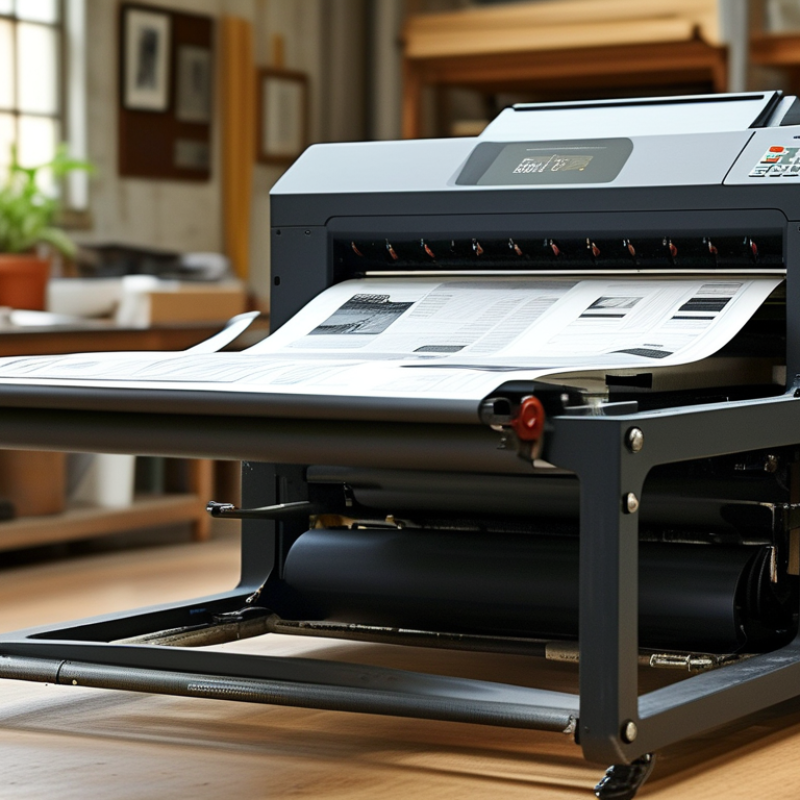
Start with the job, not the machine. Define what you print, how often, and where each piece will be used. A short-run menu needs different priorities from a large batch of product labels. Record dimensions, substrates, color requirements, finishing steps, and monthly volume. Ask whether output must survive sunlight, moisture, folding, or frequent handling. These details shape the right digital printing solution.
Output quality needs a measurable target. Do you need smooth skin tones, sharp small text, accurate colors, or simply readable documents? Request physical samples on the actual substrate, because a screen preview can hide ink spread and texture. Inspect gradients, fine lines, solid fills, registration, and edge detail under normal viewing distance. Use a color reference and agree on acceptable variation before production. Keep the approved sample. Test it physically.
Practical testing often reveals trade-offs. A slower setting may improve detail but reduce daily capacity. More coverage can increase drying time and cost. I once approved a sharp proof without checking folding; cracks appeared on the finished piece. That mistake changed my checklist. Now I compare quality, turnaround, waste, and operator adjustments together. Ask for repeatability data, maintenance records, and a clear tolerance range. Do not choose the highest resolution automatically. Choose the quality your audience will notice and your workflow can reliably deliver.
Define your printing goals and required output quality before selecting equipment, media, and workflow settings.
Typical production guidance recommends approximately 300 DPI for sharp text, brochures, photos, and standard marketing materials. Higher-resolution workflows of 600 DPI or more may be useful for fine-art reproduction, detailed line work, and applications requiring additional image detail. The final setting should also consider viewing distance, substrate, ink technology, and file quality.
Choosing a digital printing solution starts with the material, not the machine. Inkjet systems suit high-volume work, variable data, and porous substrates such as uncoated paper or corrugated board. Toner systems often deliver sharper text on coated sheets and perform well with short, customized runs. However, these differences are not absolute. Drying, adhesion, colour stability, and finishing requirements can change the result.
Smithers’ The Future of Digital Print for Packaging to 2028 estimates that digital packaging print will grow from about 22 billion dollars in 2023 to over 36 billion dollars by 2028. This expansion reflects demand for shorter runs and faster version changes. Compare this trend with your materials. Test coated paper, recycled stock, synthetic film, and textured board under real production conditions. A smooth sample can hide poor ink adhesion.
Substrate testing matters.
FESPA’s 2023 Print Census surveyed more than 1,000 printing companies worldwide. It reported that 65% expected higher turnover, encouraging investment in flexible digital workflows. Still, speed alone is a weak selection criterion. Check colour consistency across a full shift, drying time before lamination, and waste during setup. I once judged a solution from its first sample and overlooked finishing problems. That was careless. Request repeat tests, measure usable sheets, and compare total cost per finished piece, not only the quoted click price.
| Tip | Decision Dimension | What to Evaluate | Best-Fit Technologies | Suitable Materials | Practical Guidance |
|---|---|---|---|---|---|
| 1 | Define the application and image quality | Identify whether the output is intended for indoor graphics, outdoor signage, labels, packaging, décor, textiles, or short-run commercial work. Check the required viewing distance, fine text, gradients, and color consistency. | Aqueous inkjet for detailed indoor graphics; UV inkjet for rigid and specialty substrates; toner-based systems for short-run commercial documents; dye-sublimation for textile graphics. | Coated paper, photo paper, synthetic sheets, paperboard, rigid boards, films, fabrics, and transfer paper, depending on the ink or toner system. | Choose the process that meets the required visual quality without paying for capabilities the application does not need. |
| 2 | Match the substrate and surface condition | Consider absorbency, coating, porosity, flexibility, heat sensitivity, thickness, surface energy, and whether the material is rigid or roll-fed. | UV inkjet handles many coated and uncoated rigid or flexible materials; solvent and resin systems are suitable for flexible films; aqueous systems generally need compatible coated media. | Paper, cardstock, vinyl films, banners, canvas, acrylic, aluminum composite panels, corrugated board, polyester fabric, and heat-transfer media. | Request substrate samples and perform adhesion, drying, scratch, curl, and color tests before standardizing a material. |
| 3 | Calculate required production volume | Estimate average monthly area or sheet count, peak demand, job length, changeover frequency, and the percentage of personalized or variable-data work. | Toner systems are effective for short and medium sheet-based runs; roll-to-roll inkjet is efficient for continuous graphics; high-speed inkjet is suited to larger recurring volumes. | Cut sheets, continuous rolls, label stock, banner media, textile rolls, and pre-cut specialty media. | Size the solution for realistic peak workload rather than average workload alone, while accounting for maintenance and finishing time. |
| 4 | Compare color durability and finishing needs | Review exposure to sunlight, moisture, abrasion, chemicals, folding, lamination, and the expected service life of the printed product. | UV, solvent, and resin inkjet commonly provide strong durability for signage and displays. Aqueous and toner prints may require lamination or protective finishing for demanding environments. | Outdoor vinyl, banner materials, coated boards, indoor paper, synthetic labels, laminated films, and polyester textiles. | For outdoor use, validate the complete system: ink, substrate, laminate, environmental exposure, and installation method. |
| 5 | Assess drying, curing, and turnaround time | Determine whether prints must be handled, laminated, folded, trimmed, or shipped immediately after production. | UV inkjet cures ink at the printer; toner is dry when produced; resin systems generally dry through heat; aqueous and solvent systems may require additional drying or outgassing. | Immediate-use sheets, rigid boards, flexible films, labels, photo media, and textile transfer materials. | Confirm the actual time from printing to finishing, not only the printer’s rated production speed. |
| 6 | Review operating cost and waste | Include ink or toner consumption, media cost, energy, maintenance, labor, setup waste, rejected prints, ventilation, and finishing requirements. | Digital systems reduce plate and setup requirements. Toner is convenient for sheet work, while inkjet can be economical for wide-format or continuous production when utilization is high. | Standard paper, recycled paper, coated media, synthetic substrates, films, boards, and textiles with different waste and handling profiles. | Compare total cost per finished unit at your real coverage, print width, run length, and maintenance schedule. |
| 7 | Check workflow, sustainability, and scalability | Evaluate file preparation, color management, automation, variable-data support, operator skills, ventilation, energy use, waste handling, and future capacity. | All major digital technologies support automated workflows, but configuration and software requirements differ. Aqueous systems can suit controlled indoor production, while UV, solvent, resin, and textile systems require application-specific operating controls. | Recyclable papers, certified papers, PVC-free films, recyclable boards, polyester textiles, and other application-approved media. | Select a platform that can grow with expected demand and verify environmental claims for the complete print-and-finish process. |
| Technology | Typical Strengths | Common Limitations | Typical Materials | Common Applications |
|---|---|---|---|---|
| Aqueous Inkjet | High image detail, smooth photographic tones, and strong results on compatible coated media. | Media compatibility is important; prints may need lamination for demanding durability requirements. | Coated paper, photo paper, fine-art paper, and selected synthetic media. | Posters, photographs, fine-art reproductions, indoor displays, and proofing. |
| Solvent or Eco-Solvent Inkjet | Good adhesion and flexibility on many sign films; suitable for graphics exposed to outdoor conditions when properly finished. | May require ventilation, drying, or outgassing before lamination and installation; substrate selection affects performance. | Flexible vinyl, banner fabric, coated films, and selected outdoor media. | Vehicle graphics, banners, window graphics, and outdoor signage. |
| UV Inkjet | Instant curing, broad substrate range, and the ability to print on many rigid and flexible materials. | Ink adhesion and flexibility vary by substrate and ink formulation; surface testing is essential. | Acrylic, aluminum composite, PVC-free boards, corrugated board, wood-based panels, films, and coated papers. | Displays, packaging prototypes, décor, rigid signage, labels, and specialty graphics. |
| Resin or Latex-Type Inkjet | Good flexibility, low-odor options, and broad use across indoor and outdoor graphics, subject to the specific formulation. | Heat and drying settings can affect sensitive media; energy consumption may be significant during curing. | Vinyl, paper, polyester films, wall coverings, canvas, and banner materials. | Retail graphics, wall décor, posters, banners, and vehicle or window graphics. |
| Dye-Sublimation | Vivid color and excellent penetration into polyester fibers or polymer-coated rigid products. | Primarily limited to polyester textiles or specially coated transfer products; cotton is not directly compatible with standard dye-sublimation. | Polyester fabric, polyester-coated metal, coated ceramics, and transfer paper. | Flags, soft signage, sportswear, apparel, interior textiles, and personalized gift products. |
| Electrophotographic Toner | Dry output, reliable variable-data handling, strong text reproduction, and efficient short-run sheet production. | Substrate and heat compatibility can limit media choices; very long runs may require a different production platform. | Uncoated and coated paper, cardstock, synthetic sheets, labels, and selected specialty stocks. | Brochures, direct mail, books, labels, transactional documents, and personalized marketing materials. |
Note: Performance, durability, media compatibility, production speed, and operating cost vary by equipment configuration, ink or toner formulation, environmental conditions, and finishing method. Always validate the complete workflow with representative samples.
1. Define the color target before comparing machines. Digital packaging print is projected to exceed 36 billion dollars globally by 2028, according to Smithers’ 2024 market study. Color consistency will matter more as short runs grow. Request a calibrated proof and measure ΔE00 values under standard lighting. Visual judgment alone is risky. It can mislead.
2. Test fine details at the real production speed. Check small text, gradients, skin tones, and solid fills. A high resolution number means little if edges look rough.
3. Compare rated speed with usable speed. Include drying, setup, cleaning, and changeover time.
4. Calculate monthly capacity from actual shift patterns, not brochure figures.
5. Run a continuous batch with mixed substrates. Watch for banding, color drift, paper jams, and operator intervention. The 2024 drupa Global Trends Report shows that many printers are handling changing volumes, but profitability varies widely by market. Capacity must survive busy weeks, not only demonstrations.
6. Ask for repeatability data across several days.
7. Confirm whether workflow software supports automated color checks and production logs. I once trusted a fast sample that failed during a longer run. The machine was not defective; my test was incomplete. That mistake still shapes how I evaluate printing systems.
Tip 1: Map workflow integration before comparing hardware. A digital printing solution should connect with order management, prepress, color control, and finishing systems. Smithers’ The Future of Digital Printing to 2028 valued the global digital print market at about $136.7 billion in 2023. That scale increases pressure on connected production. Ask vendors to demonstrate a real job, including file checks, approval changes, and reprints. A polished demo can mislead.
Tip 2: Test software support with your own files. Confirm PDF standards, variable data handling, color profiles, and production reports. Keypoint Intelligence’s production print research consistently highlights workflow automation as a major investment priority among print providers. Request response-time targets, update policies, training options, and escalation contacts. Software is not an accessory. It controls daily decisions. I once focused too heavily on speed and underestimated integration errors. That mistake created extra manual checks.
Tip 3: Measure ease of use at the operator’s workstation. A clear queue, visible alerts, and simple preset controls reduce hesitation during busy shifts. Run a timed trial with new and experienced operators. Record clicks, recovery steps, and training minutes. Quocirca’s research on print service providers shows that automation and operational efficiency remain central to competitiveness. Still, easy does not mean basic. Advanced controls should remain available without hiding essential information. Leave room for reflection: a familiar interface may feel comfortable, yet it can preserve inefficient habits.
Digital printing costs more than the machine’s purchase price. Calculate ink, media, electricity, labor, software, finishing, service, and downtime. Smithers estimated the global digital print market could reach about $230.5 billion by 2027. That growth rewards efficient systems, not automatically expensive ones. Tip 1: Build a three-year cost model. Tip 2: Measure cost per saleable page, not cost per printed page. Tip 3: Add waste from test sheets, color adjustments, and rejected jobs.
Maintenance can quietly reshape profitability. Ask for expected service intervals, replacement-part prices, technician response times, and preventive maintenance requirements. Keypoint Intelligence regularly identifies uptime, workflow integration, and operating costs as major factors in production-print evaluations. Tip 4: Request maintenance records from comparable installations. Tip 5: Test a demanding job, including heavy coverage and mixed media. Tip 6: Record setup minutes and operator intervention. A fast engine can still lose money when calibration consumes every morning.
Future scalability needs evidence, not hopeful language. Check upgrade paths, controller capacity, automation options, cybersecurity support, and compatibility with current finishing equipment. The 2024 PRINTING United Alliance State of the Industry research highlighted continuing pressure from labor costs and changing customer demand. Tip 7: Model volume at 50%, 100%, and 150% of today’s workload. Include a second shift. Include mistakes. My own planning error was treating peak demand as an exception; it became normal within months. A smaller system may be wiser initially, but only if expansion costs are transparent.
: Record what you print, monthly volume, dimensions, materials, colors, and finishing steps. Note where each item will be used. A short-run menu needs different priorities from product labels. Check whether prints face sunlight, moisture, folding, or frequent handling.
Decide whether you need smooth skin tones, sharp small text, accurate colors, or basic readability. Request physical samples on the actual material. Screen previews can hide ink spread and surface texture. Inspect gradients, fine lines, solid fills, registration, and edges. Keep the approved sample.
Not automatically. Test detail at the speed you will actually use. High resolution means little if edges remain rough. A slower setting may improve detail but reduce daily capacity. Choose quality your audience notices and your workflow can repeat.
Test coated paper, recycled stock, synthetic film, uncoated paper, and textured board. Use real production conditions. Check ink adhesion, drying time, color stability, and finishing performance. A smooth sample can hide weak adhesion. Test again.
Inkjet systems often suit variable data, higher volumes, and porous materials. Toner systems often produce sharp text on coated sheets and customized short runs. These differences are not absolute. Drying, adhesion, and finishing can change the result.
Include setup, cleaning, drying, changeovers, and operator adjustments. Run a continuous batch with mixed materials. Watch for banding, paper jams, color drift, and waste. Brochure speed is not production capacity. Busy weeks reveal more.
Define the color target before comparing systems. Request a calibrated proof and measure color variation under standard lighting. Visual judgment alone can mislead. Compare solid fills, skin tones, gradients, and repeated sheets. Agree on an acceptable tolerance range.
Run repeat tests across several days. Measure usable sheets, setup waste, drying time, and operator intervention. Check the first sheet and the final sheet. I once trusted a fast sample that failed during a longer run. My test was incomplete. That mistake changed my checklist.
Choosing the right digital printing solution for your factory begins with clearly defining your printing goals, product types, expected volumes, and required output quality. Consider how materials, finishes, and application requirements will affect your choice of printing technology. Compare available systems based on color accuracy, resolution, production speed, and overall capacity to ensure they can meet both current and future demands. A reliable solution should also provide consistent results across different jobs and support efficient production scheduling.
When learning how to choose the right digital printing solution for your factory, it is equally important to review workflow integration, software compatibility, operator usability, and maintenance requirements. Calculate the total cost of ownership, including equipment, consumables, training, servicing, and energy use, rather than focusing only on the initial price. Finally, select a scalable system that can adapt to changing product demands, increased order volumes, and future production improvements.

Magly Printer