Is digital printing suitable for mass production? The answer depends on volume, product type, and production priorities. Unlike traditional offset printing, digital systems do not require printing plates. This can reduce setup time, material waste, and preparation costs. A factory can move from an approved file to finished labels within hours. That speed matters when retailers change packaging details or launch seasonal products.
Digital printing also supports variable data, including names, barcodes, serial numbers, and regional designs. For example, a beverage producer can print thousands of customized labels without stopping the press. Short and medium production runs often become more efficient. There is less unused inventory and fewer outdated packages stored in warehouses. These benefits are supported by modern press specifications, workflow software, and documented quality-control procedures.
However, digital printing is not automatically the best choice for every large order. Its unit cost may remain higher for extremely long runs with identical artwork. Ink compatibility, color stability, substrate limits, and finishing capacity also require careful testing. A production manager should compare sample results, running speed, waste rates, and total cost per finished item. Numbers matter.
Experienced printers usually begin with a controlled pilot batch. They inspect color density, small text, barcode readability, and surface durability. This practical step can reveal problems that a sales estimate may miss. Digital printing is powerful, but it still has boundaries. Understanding those boundaries makes the decision more reliable, especially when mass production demands consistent quality, predictable delivery, and responsible resource use.
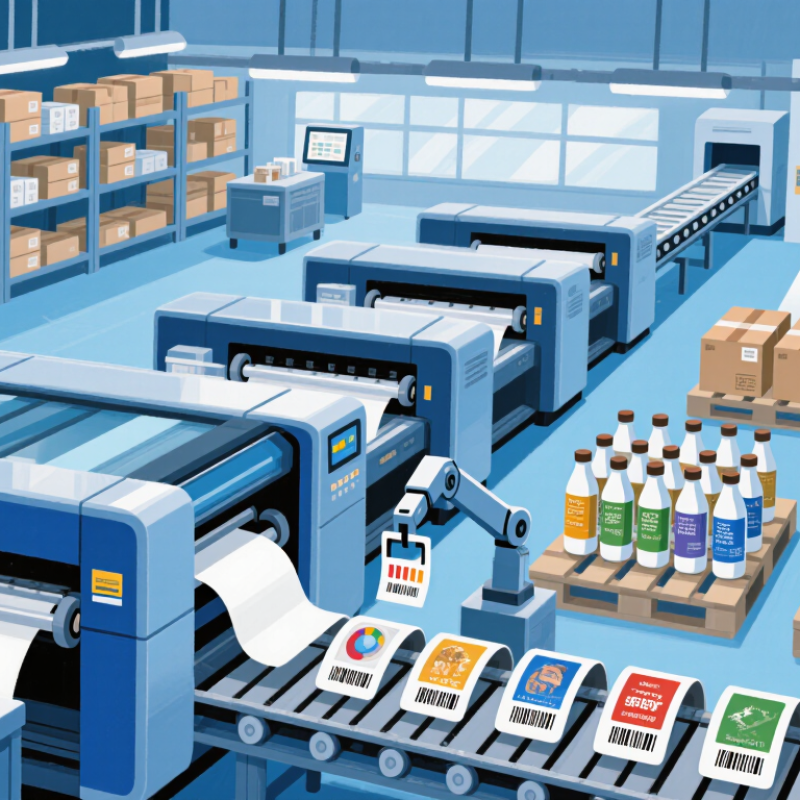
Digital printing in mass production means producing large volumes without making a physical plate for every design. Files move directly from a computer to the press. This shortens setup time and supports frequent artwork changes. It also makes variable data practical, such as different names, codes, or images on each package.
In a real production line, operators can print thousands of labels, cartons, or brochures in scheduled batches. A digital workflow reduces storage for outdated materials. It also helps teams test a smaller quantity before increasing the run. That flexibility is valuable when demand changes quickly. Waste can still occur. Ink calibration, paper movement, and file errors may interrupt production.
Quality control remains essential. Technicians check color targets, registration, drying, and surface defects throughout the run. Automated inspection can detect missing text or blurred details, but it cannot replace careful judgment. Digital printing is not always the cheapest choice for extremely large, identical orders. Its value depends on setup costs, delivery deadlines, customization, and material performance. A glossy sheet may need different ink settings than an uncoated board. Small decisions matter. Teams should record actual waste, labor time, and reprint rates instead of relying only on quoted unit prices. That evidence gives mass production a more reliable digital foundation.
| Evaluation Dimension | Digital Printing in Mass Production | Conventional Plate-Based Printing | Production Implication |
|---|---|---|---|
| Typical economic production range | From short runs of approximately 100 copies to tens of thousands, depending on equipment and application | Generally more cost-efficient for long, repeat runs after setup costs are absorbed | Digital production can support many small and medium-sized orders without requiring a separate plate-making investment. |
| Prepress setup | Usually file-based; no physical printing plates are required | Typically requires plates, proofing, make-ready, and press calibration | Shortens the path from approved artwork to production and reduces setup complexity. |
| Changeover time | Often measured in minutes for a digital file or job change, subject to media and finishing requirements | Can range from tens of minutes to several hours when plates, inks, substrates, and press settings are changed | Enables economical production of multiple versions, languages, sizes, or customer-specific designs. |
| Variable-data capability | Each page or item can contain different text, images, codes, or identifiers within the same production run | Usually requires separate versions, additional setup, or offline personalization | Supports personalized direct mail, serialized packaging, tickets, labels, and security-oriented documents. |
| Minimum order quantity | Can be commercially viable from one customized copy upward, although unit cost normally falls as volume increases | Usually needs a larger quantity to distribute setup and plate costs | Reduces overproduction and allows manufacturers to produce closer to actual demand. |
| Make-ready waste | Generally low because there is no conventional plate and ink-register setup stage | Typically higher during registration, color adjustment, and press setup | Improves material utilization, especially for short runs and frequent job changes. |
| Turnaround time | Often same day or within a few production days, depending on volume, finishing, and workflow | Often longer when plate production, press scheduling, and make-ready are required | Makes rapid replenishment and time-sensitive campaigns more practical. |
| Version management | Multiple versions can be stored and released directly from a digital workflow | Each major version commonly requires additional plate preparation and press planning | Supports regional, seasonal, multilingual, and regulatory content variations. |
| Inventory requirements | Can support just-in-time or on-demand production with fewer finished goods held in storage | Longer runs may lower unit cost but can create larger finished-goods inventories | Reduces the risk of obsolete printed materials when designs or regulations change. |
| Quality consistency | Automated control systems provide consistent output, although color can vary by device, substrate, and calibration | Can provide highly consistent long-run output after press stabilization, with setup-dependent variation | Both methods require process control, calibration, approved profiles, and inspection procedures. |
| Labor and workflow | More automated file-to-output workflows with fewer mechanical setup stages | Usually requires more specialized setup activities for plates, ink systems, registration, and press operation | Digital printing can simplify high-mix production, while automation and operator skill remain essential. |
| Best mass-production fit | High-mix, short-to-medium runs, personalized products, frequent updates, and demand-driven replenishment | Very long, standardized runs with stable artwork and high volume per version | Digital printing is suitable for mass production when flexibility, speed, version control, and reduced waste are more important than the lowest unit cost at very large volumes. |
Note: The figures and ranges are typical industry-level benchmarks. Actual performance varies according to press configuration, substrate, ink or toner system, finishing requirements, job complexity, and production volume.
Digital printing sends artwork directly from a computer to the press. It avoids creating a physical plate for every design. This supports large batches and frequent artwork changes. The process is flexible.
Files move from preflight software to the press with fewer physical preparation stages. Operators can correct approved artwork shortly before production. A line may switch designs within minutes. That reduces downtime.
Yes. Variable data can change names, codes, images, or text on every item. A 500-copy order can contain 500 different versions. This helps with regional packaging and targeted campaigns. File mistakes remain possible.
It can reduce waste during setup and short production runs. Teams can test a small batch before increasing volume. Short jobs may leave little unused paper or board. Waste still happens.
No. Extremely large, identical orders may have lower unit costs through conventional production. Digital printing becomes more attractive when designs change frequently. Compare setup labor, storage, spoilage, delivery time, and reprints. Unit price alone misleads.
Technicians should check color targets, registration, drying, and surface defects. They should also inspect small text and barcode readability. Automated systems can find missing or blurred details. Human judgment still matters.
Yes. Glossy sheets and uncoated boards may need different ink settings. Technicians should confirm drying, color, and surface performance before scaling. A material test can prevent a costly reprint. Small choices matter.
Review the artwork, variable data, colors, dimensions, and finishing instructions. Run a short test and inspect physical samples under normal lighting. Record actual waste, labor time, and reprint rates. The checklist may feel basic.
Is digital printing suitable for mass production? Yes, especially when production requires speed, flexibility, and consistent quality. In a mass-production context, digital printing transfers artwork directly from a digital file to the printing surface, eliminating the need for traditional plates and lengthy preparation. This streamlined workflow allows files to be adjusted quickly, jobs to move into production with fewer interruptions, and short or large print runs to be managed efficiently. Reduced setup time also helps lower labor, material, and operating costs, particularly when multiple designs are produced in succession.
Another important advantage is the ability to support customization and variable data within the same production run. Each item can contain different text, images, codes, or layouts without stopping the workflow, making digital printing useful for personalized packaging, marketing materials, and targeted communications. Its overall efficiency depends on factors such as print speed, file preparation, machine capacity, material compatibility, automation, color management, and finishing requirements. When these elements are properly coordinated, digital printing can provide a practical and scalable solution for mass production.

 Magly Printer